
How can we help you?
Here in our Help Center you will find all general answers to questions about billing, admin panel, product and much more.
Administration / Admin Panel
/Further information
/Synchronized group chats for user groups
Synchronized group chats for user groups
This feature allows you to easily manage the chat participant list based on the composition of your group.
How does this work?
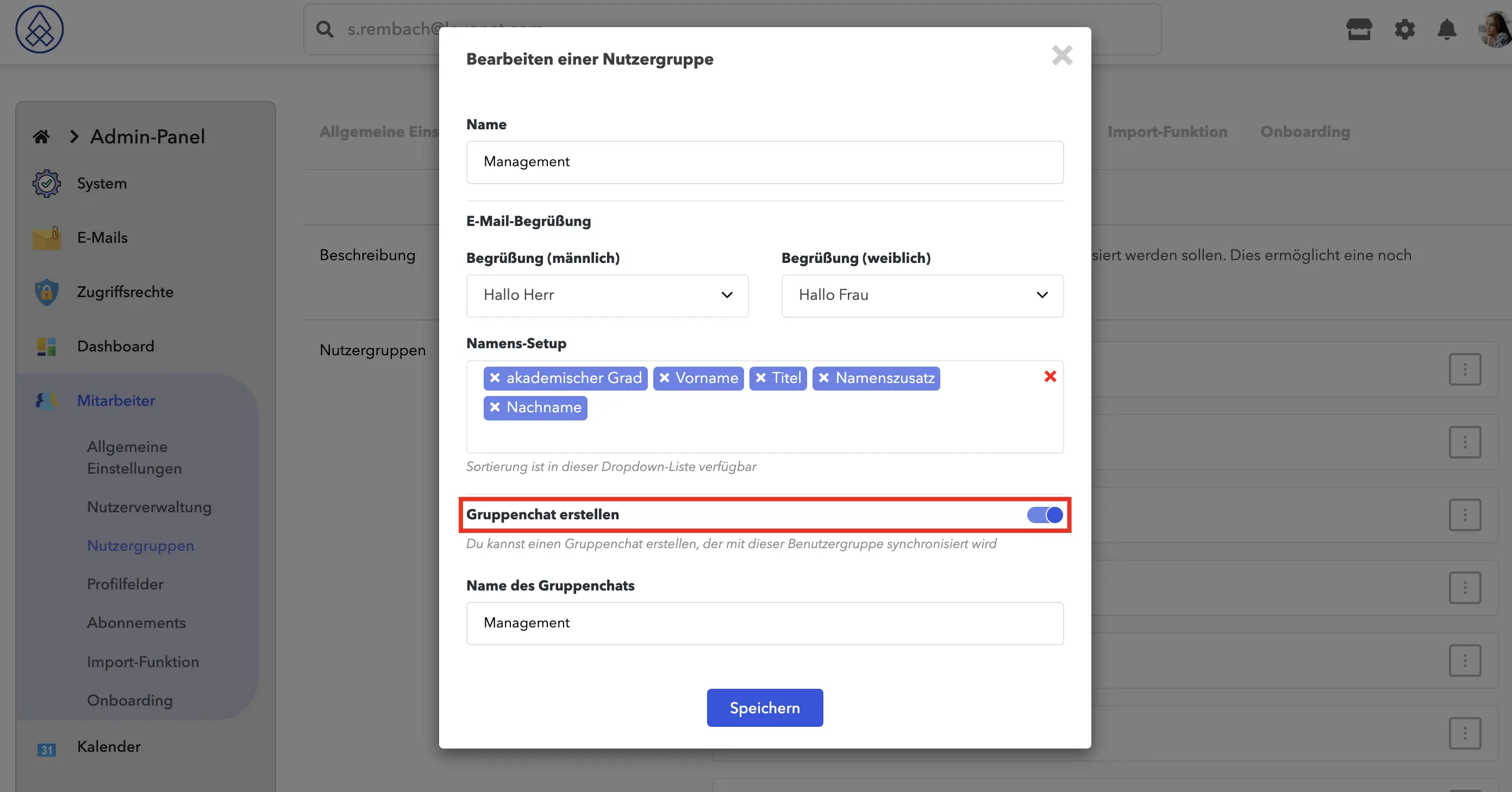
When you create or edit a user group in Loxnet, you have the option to activate the "Create group chat" option. When this option is enabled, the system will automatically create a group chat associated with the user group.
Advantages of automatic synchronization:
- Updating the participant list: As you add new users to the group or remove existing ones, the group chat participant list is automatically updated. You don't have to worry about manual updates.
- Ease of Use: The Create Group Chat option is available in the admin panel when you create a new group or edit an existing one. This simplifies the process of managing group chats, making it intuitive and easy. You can activate the option in the “User Groups”
tab by clicking on the three dots next to the group and selecting “User Group Settings” . In addition, the name of the group chat can differ from the group name at any time. You can change the name at any time.
Important to note:
If you deactivate the "Create group chat" option, the group chat will be completely deleted. This includes deleting all messages and content in the chat. If you activate the option again, the chat will be recreated.